
A Cleaner Registration Hub for Managing Library Programs
Program registration is one of the busiest parts of managing library events. Staff need to quickly see who is registered, who is on the waitlist, who canceled, and what details patrons shared when they signed up.
The updated WhoFi Registration Hub was designed to make that process easier.
Instead of working from multiple side-by-side lists or downloading registration details every time you need more information, staff can now review registrations in a cleaner, more organized layout.
What’s New in the Registration Hub
The refreshed Registration Hub includes:
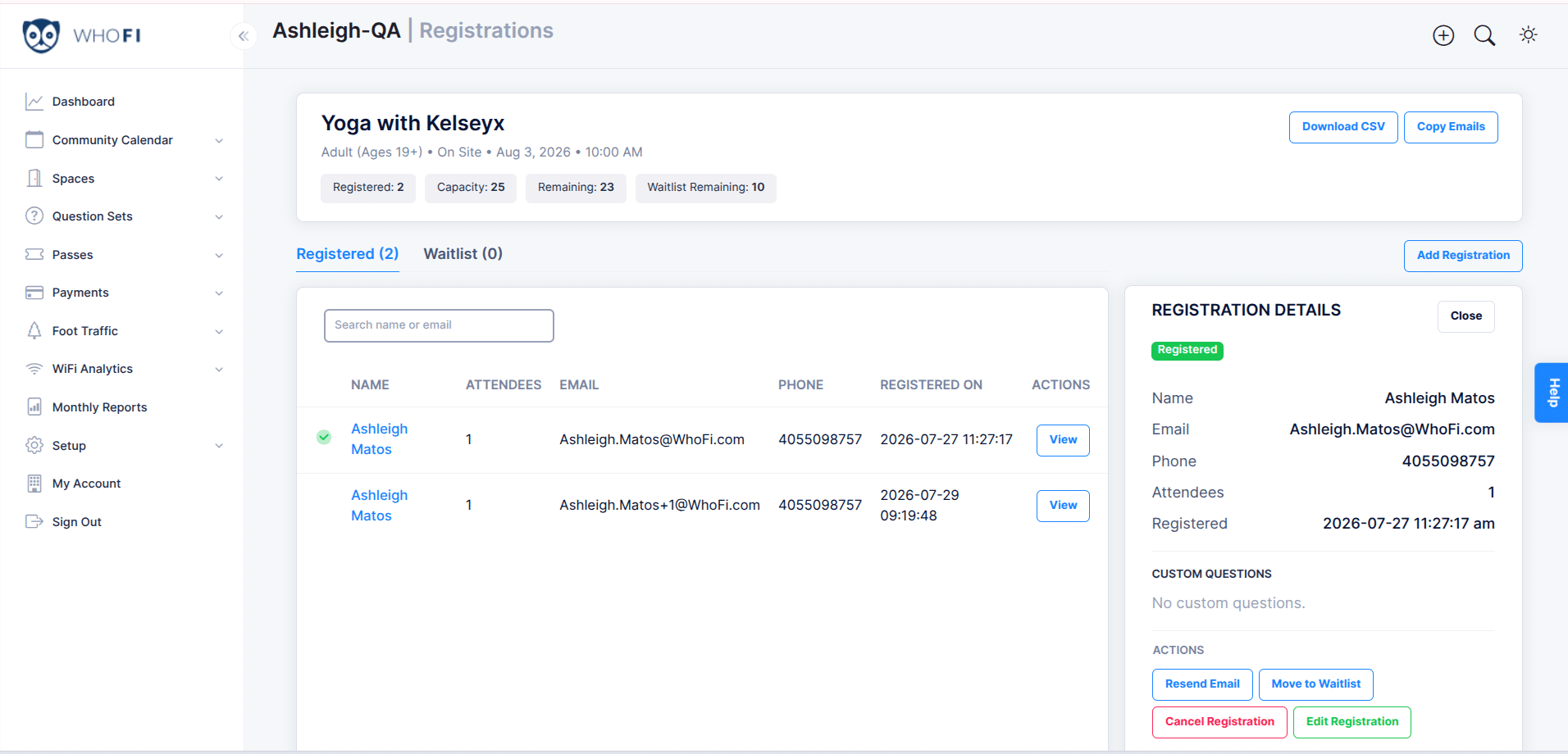
- Summary details at the top so staff can quickly review the status of a program’s registration.
- Tabs for different registration groups including registered patrons, waitlists, and canceled registrations.
- A new drawer view that lets staff click “View” and see patron details on the right side of the screen.
- Custom question answers visible in WhoFi so staff can review patron responses without downloading the full list.
- Quick action buttons for common staff tasks.
These updates help staff get to the information they need faster, especially during busy program seasons.
Easier Day-to-Day Registration Management
The new drawer view gives staff a simple way to review one patron at a time while keeping the full registration list visible. From there, staff can take helpful actions like:
- Resend a confirmation email
- Edit a registration
- Cancel a registration
- Move someone to the waitlist
- Restore a canceled registration
This is especially helpful when a patron calls the library with a question or needs help updating their registration.
Clearer Communication for Patrons
WhoFi also improved the patron experience around cancellations and waitlists. If a registration is canceled, patrons now see a clearer confirmation page. Registration emails and final submission screens also make it easier to understand whether someone is registered or on the waitlist.
These small changes can reduce confusion and help patrons feel more confident about their next steps.
The updated Registration Hub gives library staff a clearer, faster way to manage program signups, while helping patrons better understand their registration status.
