
WhoFi Unified View – One Calendar for Events, Spaces, and Passes
Library calendars can fill up quickly. Programs, study rooms, community meetings, pass reservations, and staff-led events often happen across the same day.
Unified View is the new feature from WhoFi that brings those moving parts together.
What Is Unified View?
Unified View is a new option that shows activity from across the different WhoFi features in one calendar.
Staff can now see:
- Community Calendar events
- Space bookings
- Pass reservations
This gives your team a clearer picture of what’s happening across the library.

What Makes It Unique?
Unified View is more than another calendar layout. It combines different parts of WhoFi so staff can see how programs, rooms, and passes overlap.
This helps your team:
- Spot open times in the schedule
- Avoid conflicts
- Understand busy days
- Plan new programs around available space
- Coordinate with front desk and facilities staff
For busy libraries, that full-picture view can make planning much easier.
Color Coding and Filters
In Unified View, items are color coded by feature. Events, spaces, and passes each have their own color, and those colors can be adjusted in calendar settings.
Filters also let staff turn different items on or off. You can view everything at once, or focus only on the activity you need.
Flexible Calendar Views
Unified View includes several ways to review the schedule:
- Week view
- Week list view
- List view
- Printable PDF view
Week list view is especially helpful when many things are happening at once because it removes open gaps and shows activity in a simple list.
The printable PDF can be used for staff meetings, desk reference, facilities planning, or internal communication. If shared digitally, links can take users directly to related events.
Better Visibility for All-Day Activity
All-day events and pass reservations now appear in a clear all-day section at the top of the schedule. This keeps important activity visible without crowding the timed calendar.
How to Access It
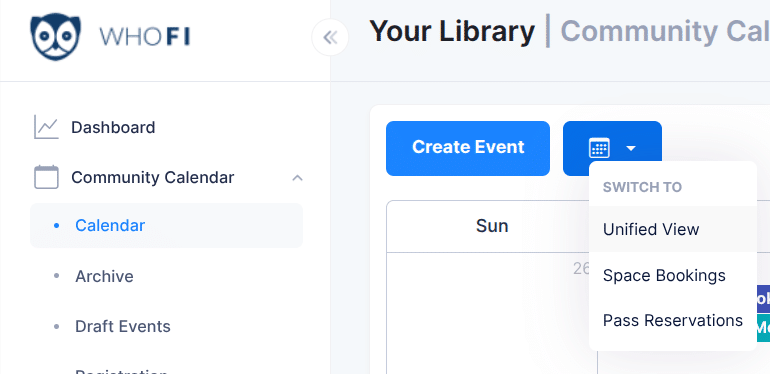
Unified View is available within your Community Calendar sub-menu.
- Click on the “Community Calendar” menu.
- Click on “Calendar”
- In the “Switcher” next to “Create Event”, you’ll see the “Unified View” drop down.
- Click on the “Unified View” link.
A Clearer View of the Day
Unified View helps staff see the full schedule without checking multiple places. With events, spaces, and passes now visible together, your team can plan more confidently and help your community make better use of your building.
