
Q3 2025 WhoFi Webinar and Product Updates
This recorded video webinar shows you quickly some of the updates and enhancements to the WhoFi service over the last year that can help you save time, cut errors, and get cleaner insights from the tools you already use in WhoFi.
You’ll see how Question Sets replaces scattered spreadsheets with one organized workspace you and your team can trust. Daily, monthly, and annual trackers auto-save, roll up totals for you, and log who changed what. So, you can spend less time hunting numbers and more time acting on them. Built-in formulas reduce manual math, and tooltips standardize what to count, which helps new staff contribute confidently. If you’re already using Wi-Fi Analytics and Community Calendar, your program and attendance data auto-syncs into the right questions. This gives you a head start on board reports and state surveys. You’ll also learn how to import historical numbers and copy prior years to keep your instructions and workflows intact.
For programming teams, the Community Calendar segment helps you streamline the entire lifecycle. You’ll learn how to plan events, publish them to your website, capture registrations, and record attendance in two clicks. You’ll see practical setups for time-slot, series, and per-attendee registration, plus automated confirmations and 24-hour reminders that reduce no shows. Reporting options include quick, downloadable infographics for board packets and detailed comparisons for directors. Now you can advocate with clear visuals, not spreadsheets.
If you manage rooms or other areas, the Spaces walkthrough shows how to let patrons manage their own room bookings while your staff keeps control. You’ll learn to set auto or manual approvals, apply fair use rules to prevent monopolization, display availability online, and add kiosk mode outside a room. Internally, the bookings list, pending queue, and usage reports make it easy to find reservations fast and show trends to stakeholders.
Finally, you’ll get a preview of what’s next. You’ll hear first takes on draft mode for programs, museum pass reservations, makerspace equipment scheduling, and payments for room bookings. By getting a first look, you can decide which pilots to join and shape the roadmap.
By watching the video, we hope you’ll leave with concrete setups, report templates, and settings you can apply today to reduce your workload and improve your advocacy!
▶️ Watch the full interview on YouTube - https://youtu.be/BlXM6rvDDx8

Public Library Insights Q2 of 2022
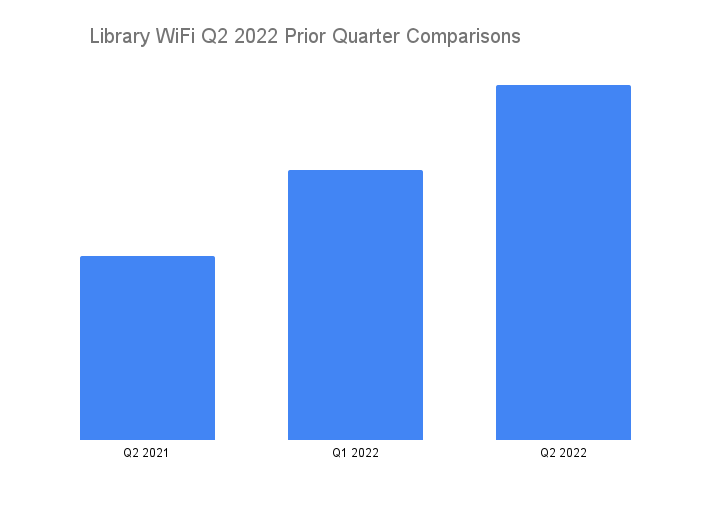
The second quarter of the year saw the continued higher usage of WiFi among libraries of all population sizes. There was a steady, sustained increase for each of the months in the second quarter of the year. This resulted in a 31% increase when compared to the prior quarter of Q1 2022. This also resulted in a 93% increase when compared to the same quarter of the prior year, or Q2 of 2021. The same quarter prior year increase is particularly encouraging because it indicates that seasonality alone is not responsible for the jump in usage.
This data continues to show that we may be entering a post-pandemic "new normal" where a new baseline is being established. Library WiFi is now busier than it was during the height of the pandemic and consistently so across all months and population sizes for the quarter. Including March of 2022, we've now seen four consecutive months where the monthly WiFi usage was higher than in any month of 2021.
Steady results among all population sizes
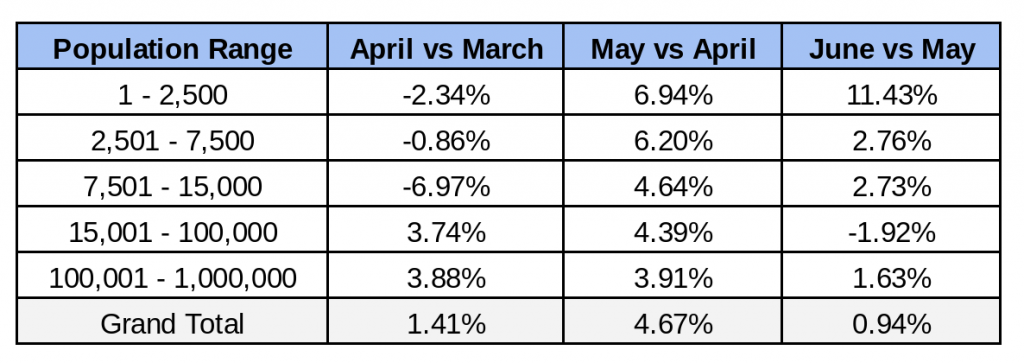
One of the most remarkable things about this quarter was how consistent the public WiFi usage was at the libraries for every single month. We've yet to have a quarter where the growth or declines were this minor across all population sizes across each month.
The chart below shows a very stable WiFi usage number for each month and population group. Most of them showed steady usage neither increasing or decreasing by more than 7%, and only one group saw double digit changes.
Weekly WiFi usage by population size
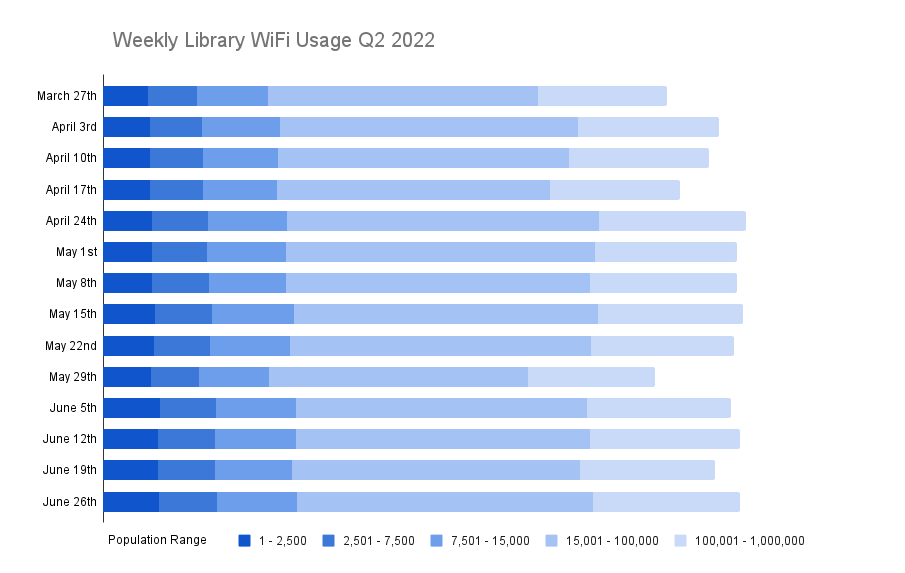
Looking at the WiFi usage week over week broken down by population shows the same levels of steady use. Other than the Memorial Day holiday week of May 29th, you'll see how consistent the WiFi usage at the libraries was through the quarter. There were no major increases or decreases based on population, and only some variance between weeks of whether smaller or larger libraries were increasing or decreasing. Again, this is showing steady, consistent patron usage of library WiFi in Q2.
What does this mean for these libraries and how can they best serve their community going forward?
The data is clear: WiFi is a valuable resource the libraries offer to help their communities. As libraries begin to prepare for the year ahead and planning for the future, tracking WiFi usage could prove beneficial for library advocacy efforts, operational improvements, strategic planning, and accurate reporting for the PLS survey. Having such information can give libraries the tools they need to secure funding to provide more and better services, and even help guide decisions on how to best use their space.
July 2021 to June 2022 Results
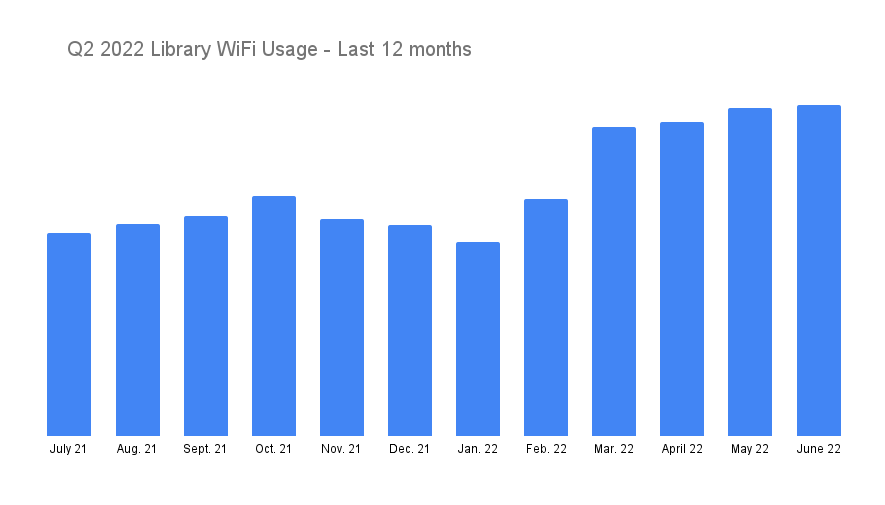
Looking at the data over the last twelve months shows a story about how much higher the increase this quarter appears to be. All three months of Q2 were higher than any month in 2021. While February and March of 2022 had the highest percentage increases, April, May, and June are showing that the prior months were not just single data points, but establishing a new baseline.
Carrying insights into the future
This data solidifies the importance of public libraries within the communities they serve. Throughout the pandemic, public libraries continued to help patrons stay connected to school, work, and family. In addition, they also continue to help provide social service assistance for their community members through filing for unemployment, Census registration, and job searches. In a post-pandemic "new normal" we expect to see continued use of the library WiFi by the communities and the patrons that they serve.
Q4 Effects of COVID-19 on Public Library WiFi Use
WhoFi analyzed data from our library partners to determine the effect of COVID-19 on patron WiFi usage. This report includes our findings during Q4 2020.
We’re now ten months into the COVID pandemic, and public libraries continue to adapt to this new normal by reinventing their services to meet the current needs of their communities. These new innovations are taking place across the country. Libraries are bolstering their online collections and expanding access, enhancing access to public WiFi, making it easier to get a library card, starting and adding to their virtual programming, adding outdoor programming, offering curbside pick-up, and curated book bags, to name a few.
This new reality created an environment for public libraries to rethink and improve how they serve communities. In many cases, libraries have migrated their in-person programming to the digital space. The flexibility of online programming is helping libraries reach additional community members. For some programs, this has resulted in increased attendance since patrons can attend storytime or participate in a seminar at their convenience and without concern for building capacity.
Many library buildings have reopened, but are operating at a limited capacity in accordance with safety guidelines. Services like grab-and-go, limited computer use, and printing/scanning/faxing are available inside the building, while other programming and outreach remain online. Libraries are providing more online resources (e-books, e-magazines, database access), virtual programming (storytime, craft sessions, etc), and WiFi access. In our library partners’ opinions, these services will continue in the future even after COVID. New demands such as video conferencing and e-learning make having high-speed internet vital to meet the changing needs of both the library and the community it serves.
Through the fall and into the beginning of winter, how has COVID affected library WiFi use in Q4?
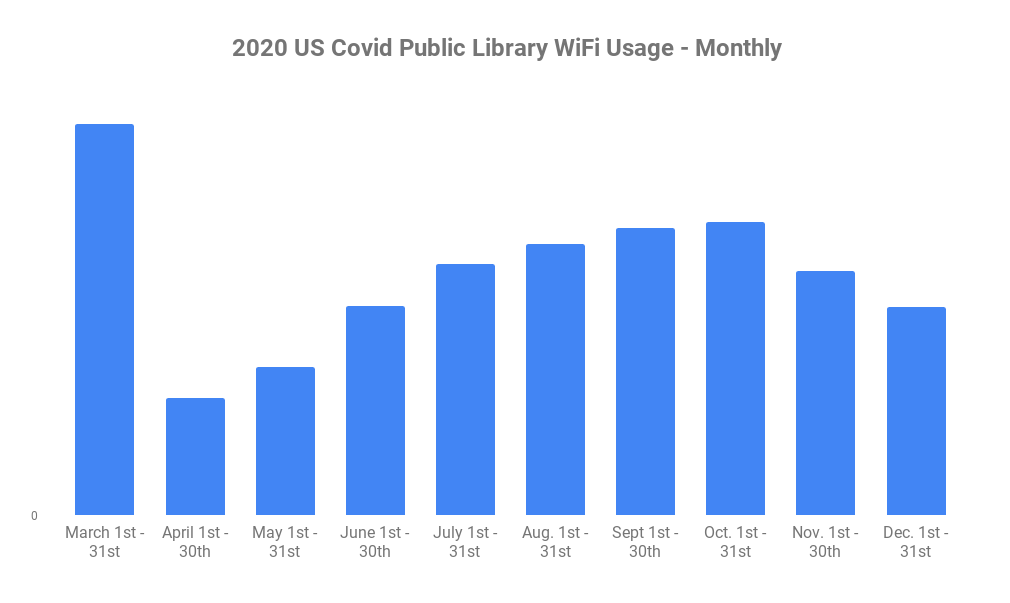
Our data shows that after the initial drop in WiFi usage in March, trends steadied and then began to rise around April 26th. There continued to be a steady increase in WiFi usage nationwide across cities and towns of all population sizes. Only most recently during the holiday season did we see the upward trend take a slight downturn. This slight decline is most visible during the weeks surrounding the Thanksgiving, Christmas, and New Year holidays. Library efforts to enhance and extend WiFi services, paired with a solid communication plan, seem to have the desired effect of helping their community members stay connected. The total number of visits, however, isn’t as high as it was prior to shut-downs, but shows continued use despite building closures. The graph below shows WiFi usage trends from March through December.
The Holidays and Seasonality still affect WiFi usage.
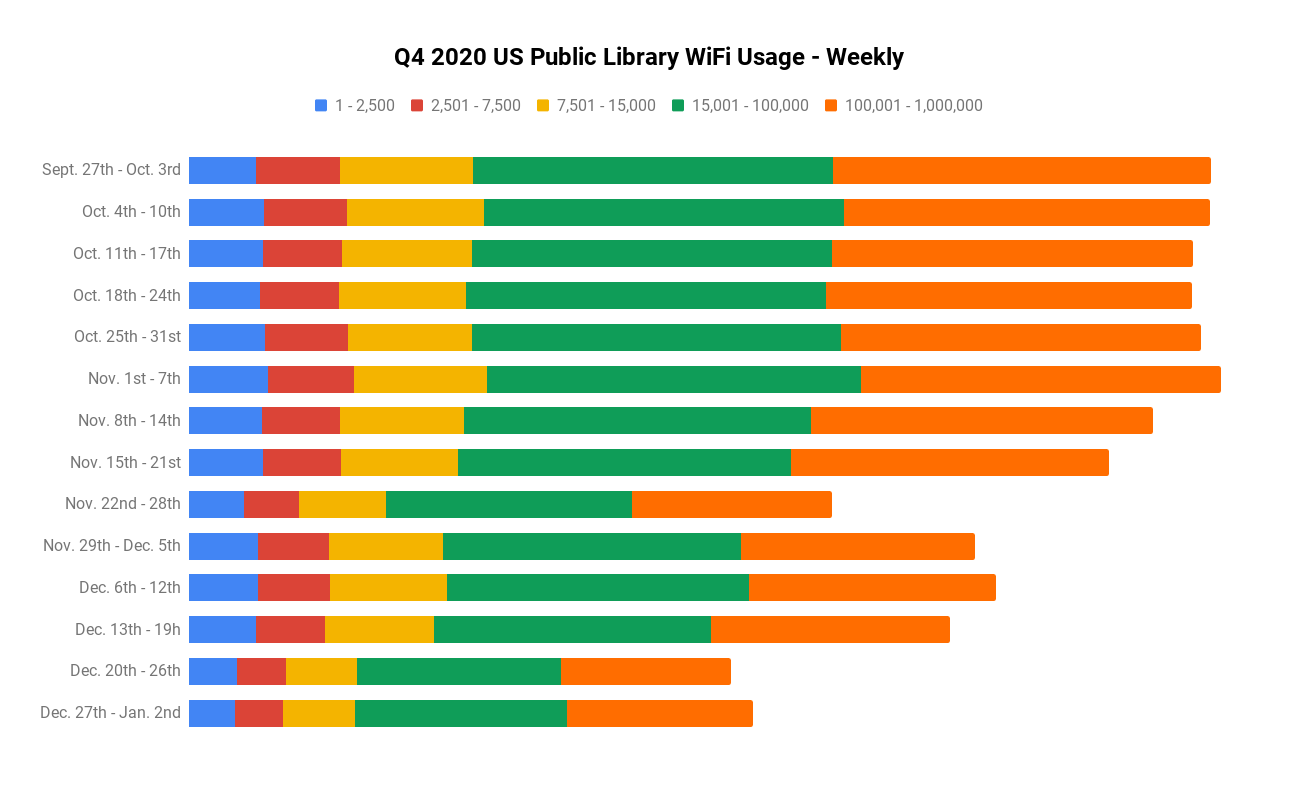
The chart below provides a week over week look at the WiFi usage throughout the quarter. This view really highlights what took place and the cause for the slight declines in November and December. The decrease in WiFi usage during the holiday weeks of Thanksgiving, Christmas, and New Years can be seen clearly below. Similar decreases can be found in previous years November and December WiFi utilization. This indicates that the decrease is more the result of seasonality.
Patrons in rural service areas often rely on the public library as their main source of internet.
Public libraries are already considered an anchor institution that provides the internet to the community. Throughout the pandemic we've seen a difference in the continued usage of public library WiFi when looking at the usage changes by population. Urban libraries had the largest decrease in usage when the pandemic hit and have had a slower return to normal.
Breakdown of WiFi usage rates by service population
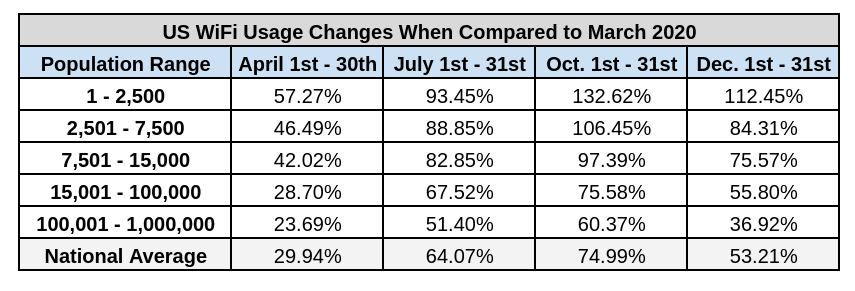
The graph above shows the WiFi usage rates of each population grouping from March to December. The most dramatic change in usage can be found in the 100,000-1,000,000 category, which has only seen about a two thirds return to previous utilization. Another interesting statistic is the 1-2,500 and 2,500-7,500 population groupings, which by October had regained all of their previous WiFi usage rates prior to the beginning of the pandemic.
Libraries are important to communities, especially in times of crisis.
After speaking with our library partners, it’s clear these adapted library services are here to stay, even after COVID. The COVID crisis has opened doors for new ways of connecting communities and enhancing library services. High-speed internet will be necessary to continue to create and distribute online programming and meet community needs for WiFi used for work, school, and personal purposes.
What’s been created out of this crisis can’t replace how libraries operated previously, nor should it. Retaining offerings of a shared community space is valuable, and in-person gatherings is something people want even more now. When adapted services are done in combination with traditional methods, everyone wins.
Even before the coronavirus outbreak, lack of internet access was a big problem. Now, it’s critical. Public libraries are on the front lines of this problem helping patrons stay connected to school, work, and family. They’ve also been important for social services such as filing for unemployment and completing the census which requires a connection to the internet. The data is clear: WiFi is a valuable resource the libraries offer. Tracking this could prove to be beneficial for library advocacy efforts, operational improvements, strategic planning and accurate reporting for the PLS survey.
Contact us for more information or to book a demo.

Analytics of Regular Customers
Jason was a regular at the coffee shop. He had glasses and a white beard. Spending a few hours reading or working on his laptop on weekday afternoons is how we usually saw him. He was always friendly to the staff. He’d been coming so long that he had become a staple, one of the people we just expected to always be there.
Then one day Jason stopped coming.
And that’s when the questions started. Was he OK? Had he moved, or found a different coffee shop? Maybe he started a new job. Did our change in layout cause an issue? He hadn’t said anything. He didn’t seem upset the last time he was here.
It can be hard to keep track of all of your patrons changing needs. That's why analytics are so helpful. Analytics create a picture of how people are using your venue and how it's changing. Sometimes small changes can have more significant effects than initially anticipated. Analytics can help get a handle on what's happening.
For example, the Power User report helps determine what’s happening with your regular customers. This report shows how frequently users are visiting your space over time. What most venues see is a large number of visitors from one to five days per month. But then they also start to see a second bump, usually around seven to twelve days. These are your power users, your regulars. But what happens when you run some comparisons over other months and notice that your power users, your regulars, have gone down.
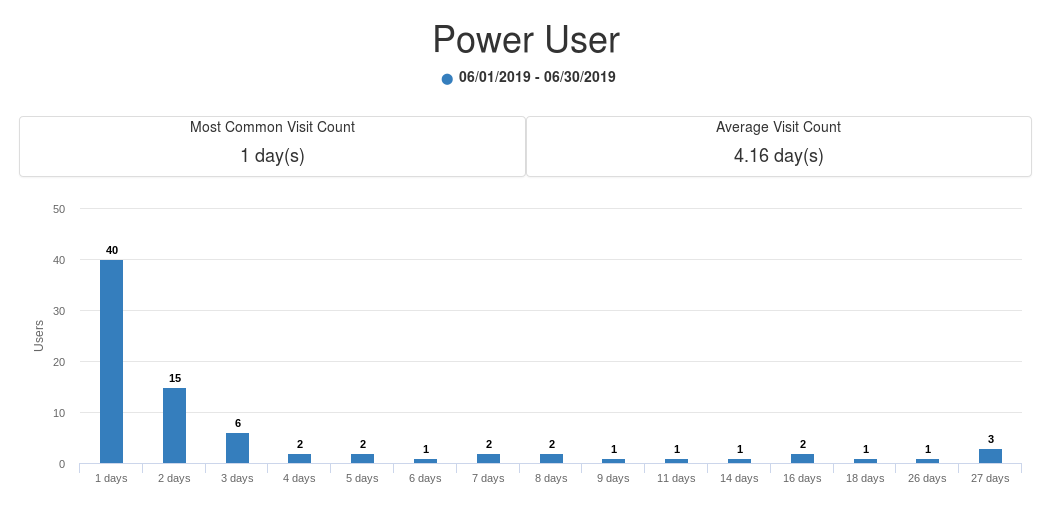
Factors that cause changes in regular visitation
Let's look at some factors we’ve seen cause a change in regular visitation.
Change in Open Hours
If a venue changes its open hours, then visitation can be affected. Doing this arbitrarily without some supporting data can cause issues.
Change in Facilities
Regular visitors will usually have specific habits, and that means particular preferences. Even a slight change in layout or amenities could upset a visitor who’s been accustomed to the same experience for months or even years. There’s not an easy solution for this, as your venue’s needs will change with time as you grow. Be communicative with your patrons about future updates and build relationships that are open and honest.
Change in Staffing
Just like facilities, the people in your venue make the biggest impact on every person who walks in the door. The loss of a local favorite can be disheartening for the patrons that look forward to their help, but don’t take it too hard. It’s a constant challenge to be providing the best possible service to every patron, and hold that standard for every member of your staff.
Seasonality
Seasonality often affects how patrons utilize a space. Some coffee shops are more pleasant when it's raining outside. Other venues are known for their outdoor patios during spring and summer months. Although seasonality can affect traffic numbers in general, for regulars, there are a few more variables to consider. The time of year will determine work schedules and free time, which can affect regulars. The summer might bring in college students or travelers. Individual work projects bringing in customers might only be during certain seasons. To take seasonality into account, it's best to compare your visitation changes to both the prior month and the same month in the prior year. Looking at both comparisons gives a more precise insight into what effect your changes are having on your patron counts.

Blocking Adult Content on Public WiFi
As the manager of a venue that offers Free WiFi, you want to make sure that it is fast, reliable, and secure. You also want to make sure that your patrons have a comfortable experience. You want them to choose to come back again and again.
One of your visitors accidentally or intentionally looking at adult content while using your Public WiFi is a tricky situation. This behavior can make your other guests uncomfortable. This sometimes leads to your internet service provider (ISP) threatening to cancel your service. You also don't want minors accidentally viewing this material at your space.
So what can you do about it?
The Debate
There are usually two approaches when it comes to handling adult content on Public WiFi systems. Both options have been listed here so you can choose which approach seems more appropriate for you.
Personal Responsibility
The first approach is to say that the internet should be free and never filtered. This group believes that all WiFi guests take responsibility. They believe that if a patron or guest is using the WiFi inappropriately, then this person should be banned either permanently or for a period of time from the venue. All other guests should have fast, unrestricted open access to the internet except for perhaps filtering known virus or malware sites. Often venues with this approach offer educational classes on how to safely use the internet. They may also require clicking through the terms of service when first joining the WiFi.
Content Filtering
The second approach is to filter certain content or websites and make this content unavailable on the Free WiFi. This group believes that it is the venues responsibility to create a positive browsing environment for all guests. This approach usually involves configuring the guest WiFi equipment to make best effort attempts to block inappropriate content. Some venues also choose to do a mix of both content filtering, education, and terms of service click through options as well.
Technical Solutions
There are several technical solutions that may help you and your venue no matter which camp you fall into. Here are two technical solutions that can help you provide your patrons with a positive WiFi experience.
DNS Filtering
DNS is short for Domain Name System. This is what translates a public IP Address like 199.59.149.165 into the more well know twitter.com. DNS Filtering is when you allow a service to only translate good or safe websites to your browser, while ignoring or blocking any websites seen as bad. Setting up DNS Filtering is fairly simple and usually takes less than 10 minutes.
There are several options for public WiFi depending on which approach you consider more appropriate.
Google DNS - No Content Filtering, but Fast
Google DNS is probably the most well known DNS Setting in the world. By setting your DNS Settings to 8.8.8.8, you are guaranteed to have fast, reliable DNS that is unfiltered. You can learn more about Google DNS here https://en.wikipedia.org/wiki/Google_Public_DNS
Quad9 - No Content Filtering, but Malware Filtering
Quad9 is a DNS option that is fast and secure. By setting your DNS Settings to 9.9.9.9, you will have fast, secure, reliable DNS that also blocks most of the known malware and phishing websites. You can learn more about Quad9 at their website https://www.quad9.net/
OpenDNS - Filters Adult Content, but mainly for enterprise lately
OpenDNS is the original content filtering DNS system. It has basic content filtering by default and several options for public venues. This system will block adult content for you and it can also let you choose if certain social media, gambling, and other categories are filtered at your location. OpenDNS was acquired by Cisco in 2015. Since then, Cisco has been promoting it's Umbrella platform for enterprises while keeping OpenDNS for home systems. Your public venue may still fall under OpenDNS licensing, but may need to upgrade to Umbrella. For more information visit https://www.opendns.com/
CleanBrowsing - Filters Adult Content, newcomer
CleanBrowsing is a relative newcomer to this space. The company launched in 2017, but it seems to tick several boxes appropriate to public venues as well as homes with children. CleanBrowsing will block adult content by default. It has both free and paid options for public venues. They're pricing also seems reasonable. As they are new, there is less known about them. You can learn more by visiting https://cleanbrowsing.org/
Hardware Based Content Filters
Several Routers also include content filtering by default or as an option. Many well known brands such as Sonicwall, Checkpoint, Sophos and Barracuda offer integrated content filtering solutions. There are several nice things about an integrated firewall based content filter. The content filtering happens locally. The content filtering can often be more robust than DNS filtering alone. For example, an inappropriate image on a Google Doc would not be filtered by a DNS filter because it is google.com, but an on premise hardware solution would still filter this.
However, if you haven't already purchased one of these firewalls for your venue, this would mean replacing your existing network equipment. You might find it best to start off with a DNS based solution, and then as you determine your needs, upgrade to an on-premise filtering solution during your next router upgrade if appropriate.
Conclusion
You work hard to give your visitors the best possible experience in your venue. Handling guests watching adult content on your WiFi is a challenge. There are several options, both technical and managerial that you can use to enable a positive experience for all. Education, Terms of Service, DNS Filtering, and Hardware based Content Filters are good choices to consider for your Free WiFi.

Cohort Analysis
Cohort Analysis is now generally available for all WhoFi customers.
The cohort function was added for directors of locations that wanted to see the direct impact of programs and events within their spaces. Rather than looking at your patrons as a single unit, breaking them into cohorts will help to identify patterns throughout the patrons life cycle.
For example, if you host a popular Creative Writing group that is on Mondays afternoons, you can add all the patrons that attend into a cohort labeled Creative Writing. Then as the weeks go on, you can see how often those individuals from the writing program come back. This creates an effective way to measure the success of the program in bringing and keeping Patrons.
This same method can be used for certain bands, user groups, and more.
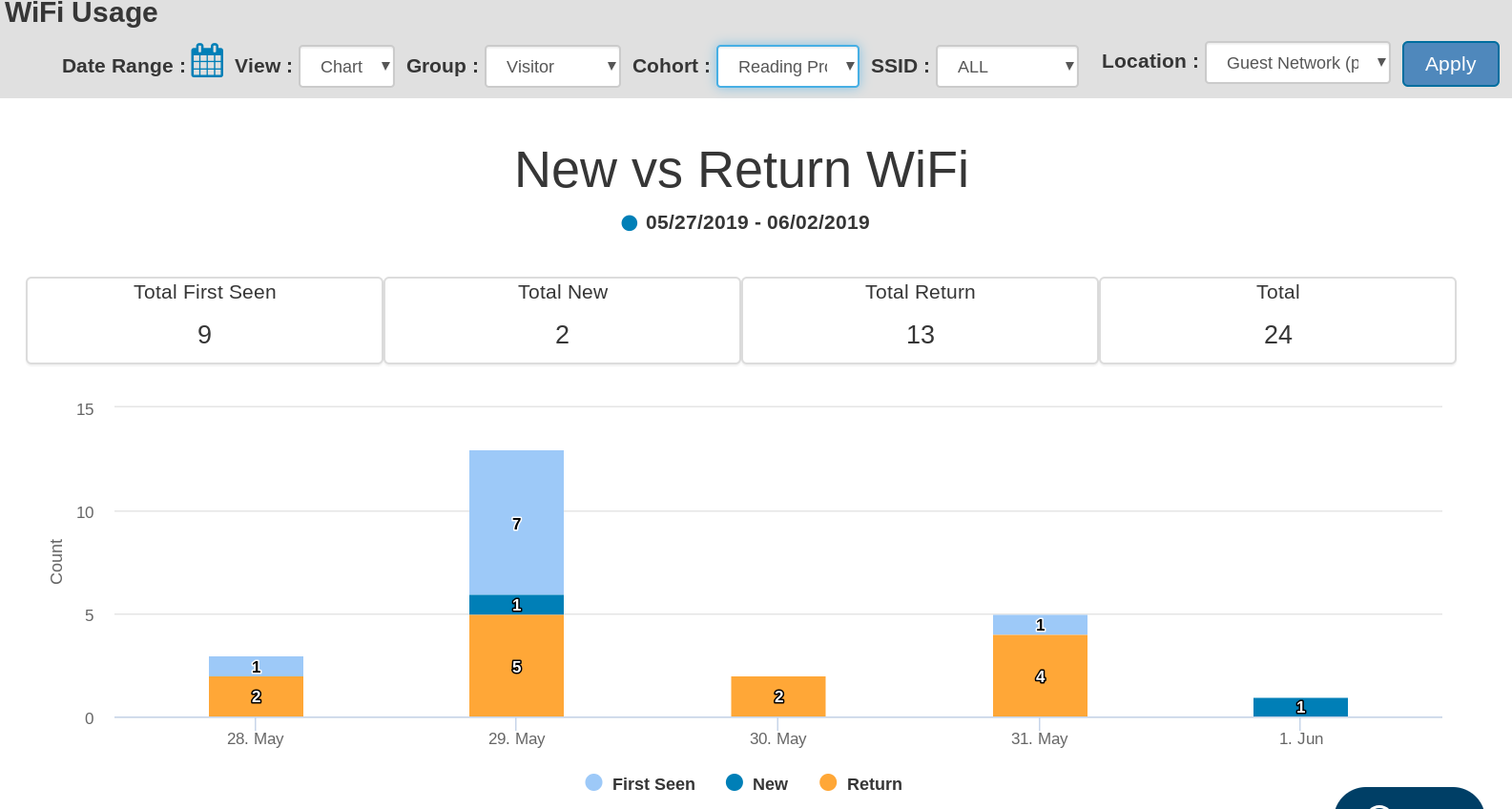
As you can see in the picture above, the cohort feature is found in the filter area. To create a cohort, you will first click on the data you'll want to group into a cohort. You will then be redirected to create your cohort name. Finally, you run your WhoFi reports with the Cohort applied to see Cohort specific results.
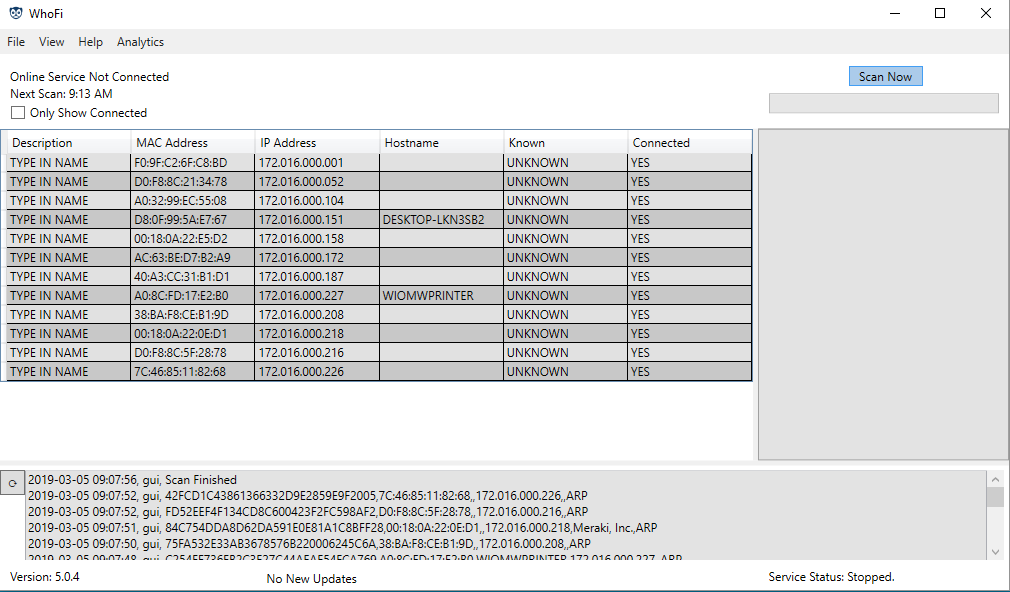
WhoFi Windows version 5.0 is now generally available
Windows version 5.0.5 was released last week on June 7th, 2019.
Version 5.0.5 is the first generally available version of the Windows 5 series.
With Windows Agent version 5, WhoFi has made some major changes from previous versions.
Who's It For
We changed the focus of the company from security to WiFi Analytics and Presence Analytics in 2015. However our free Windows version continued to be written about in consumer blogs and tech magazines as it was still useful. Although we've always appreciated our free user base, the needs of our free users and the needs of our customers have been in conflict for a few years now. The re-engineered release of Version 5.0 focuses completely on our WiFi Analytics customers. All future versions will focus on them as well.
Architecture
We built Windows 5 and above on a new core system and started from the ground up re-engineering the agent. The software is now dependent on .NET 4.5. The agent also runs as a service by default. The windows visual interface is more of a wrapper around the underlying service. This greatly benefits customers using the agent as an always on source for visitor intelligence. We also built version 5 to natively take advantage of 64-bit systems. To do this, the agent now comes in both 64-bit and 32-bit varieties. If you're unsure of what to use, please contact your customer service rep or go through the Setup Wizard in your online analytics account.
New Features
There are several new features we've added to support gathering statistics of Guest WiFi networks. We implemented using SNMP to gather information from certain Cisco Wireless controllers commonly used in City Government IT. We also implemented captive portal or splash page detection to enable better metrics when customers have Acceptable Use Policy pages, etc. And finally, there are several minor tweaks and updates that have been changed to give customers a better experience.

Insights Emails
We are excited to announce the new Insights Emails from WhoFi that you, our customer, will start receiving early in June.
The Insights Emails are a first step in helping directors or managers get a simple, digestible view of what is happening at their venue, and simple relevant steps to help improve their space. From customer conversations, it became clear that numbers for numbers sake are worthless. You don't want a bunch of numbers. You want to be able to know what's happening quickly and take actions to improve your community.
The Insights Emails are designed to give just enough information about what happened in a space, and then to give relevant blog content about steps you can take to improve your space, based on your visitor usage.
How does this help me?
Lets say you're a coworking space that's been trying to grow the number of people who visit your location. And it's turns out that last month, there was a user group that brought in a lot of first time people. But, since it was after hours, you didn't even know about it.
Here's where insights emails really shines.
The insights email will let you know about the spike at your location. It also sends a relevant blog post about how to how to dig in and find which user group caused the spike in first timers. It also suggests that you might want to have that user group or a similar user group at your space again so you can grow your membership.
The new insights emails will start going out to all customers in early June as part of your standard analytics service. We hope it helps you improve your venue, increase your membership, and ultimately improve your community.

Name Change
Who's On My WiFi officially changed it's name to WhoFi today.
There were several reasons for the name change, but one of the most important is that WhoFi is now more representative of what we actually do.
Although we started in wireless security about 6 years ago, we migrated to Visitor Intelligence and Analysis about 4 years ago, and our old name was starting to cause confusion.
Our beloved owl logo is staying the same, however, over the next 30 days, you'll see the name WhoFi being used on everything we release. You'll start to see the name change in our Agents as new agents come out, and on our Analytics platform over this weekend.
We've also combined the blog into our new main website as well.
If you haven't visited our main site in a while, be sure to visit WhoFi here at https://whofi.com
